---
title: "Workstate Codes: OAuth2 Resource Owner Flow with IdentityServer3"
description: Need to authorize your web app with OAuth2? See how resource owner password credentials flow might fit your needs.
image: https://resources.workstate.com/hubfs/blog-images/iam/IdentityServer3views.png
---
[](http://workstate.com/)
- Practices
- [Technology Team Rental](http://workstate.com/teamrental)
- [Big Data](http://workstate.com/bigdata)
- [Cloud Shift](http://workstate.com/cloud-shift)
- [QA and Testing](http://workstate.com/qa)
- [Identity and Access Management](http://workstate.com/iam)
- [Application Security](http://workstate.com/appsecurity)
- [Blog](http://web.workstate.com/blog)
- [Careers](https://workstate.workable.com/)
# Workstate Insights Blog
# Workstate Codes: OAuth2 Resource Owner Flow with IdentityServer3
January 03, 2017
by [Nathan Stilwell, Senior Consultant](https://resources.workstate.com/blog/author/nathan-stilwell-senior-consultant)
[](http://www.facebook.com/share.php?u=https%3A%2F%2Fresources.workstate.com%2Fblog%2Fworkstate-codes-oauth2-resource-owner-flow-with-identityserver3%3Futm_medium%3Dsocial%26utm_source%3Dfacebook) [](http://www.linkedin.com/shareArticle?mini=true&url=https%3A%2F%2Fresources.workstate.com%2Fblog%2Fworkstate-codes-oauth2-resource-owner-flow-with-identityserver3%3Futm_medium%3Dsocial%26utm_source%3Dlinkedin) [](https://twitter.com/intent/tweet?original_referer=https%3A%2F%2Fresources.workstate.com%2Fblog%2Fworkstate-codes-oauth2-resource-owner-flow-with-identityserver3%3Futm_medium%3Dsocial%26utm_source%3Dtwitter&url=https%3A%2F%2Fresources.workstate.com%2Fblog%2Fworkstate-codes-oauth2-resource-owner-flow-with-identityserver3%3Futm_medium%3Dsocial%26utm_source%3Dtwitter&source=tweetbutton&text=Workstate%20Codes%3A%20OAuth2%20Resource%20Owner%20Flow%20with%20IdentityServer3) [](mailto:?subject=Check%20out%20https%3A%2F%2Fresources.workstate.com%2Fblog%2Fworkstate-codes-oauth2-resource-owner-flow-with-identityserver3%3Futm_medium%3Dsocial%26utm_source%3Demail%20&body=Check%20out%20https%3A%2F%2Fresources.workstate.com%2Fblog%2Fworkstate-codes-oauth2-resource-owner-flow-with-identityserver3%3Futm_medium%3Dsocial%26utm_source%3Demail)
There are a few situations where a robust authorization solution, such as a [hybrid flow with OpenID Connect,](https://leastprivilege.com/2014/10/10/openid-connect-hybrid-flow-and-identityserver-v3/) might not be the best fit for your application. You may have a requirement that a user is never redirected away from the application. You may need to move a legacy application away from HTTP Basic or Digest authentication. The [resource owner password credentials](https://tools.ietf.org/html/rfc6749#section-1.3.3) flow provides a way for an application to authorize against, and receive an access token from, an OAuth2 server.
For this walk-through, we will use [IdentityServer3](https://github.com/IdentityServer/IdentityServer3). IdentityServer3 has become one of our favorite tools for providing authentication through OpenID Connect and can provide authorization through OAuth2. The IdentityServer team provides a number of tremendous samples, including a handful of [applications showing resource owner flow](https://github.com/IdentityServer/IdentityServer3.Samples/tree/master/source/Clients/ConsoleResourceOwnerClient). This guide will build upon those and create a basic ASP.NET MVC 5 web application with login and logout functionality and a secured example page.
### Caveats
Before going further, some limitations must be made clear.
- Resource owner flow only works for a trusted app; that is, an application that can be trusted to securely handle user credentials.
- Resource owner flow cannot be used for single sign-on (SSO). Each application should provide its own login page.
- Authorization through OAuth2 should not imply authentication; no identity information is provided in the token response. Some documentation or syntax may be confusing or ambiguous, especially around IdentityModel and OWIN.
That said, resource owner flow is a perfectly valid solution where your requirements align and OAuth2 is sufficient.
### Prerequisites
The following software versions were used in the creation of this guide.
- Windows 10 Pro
- Visual Studio Pro 2015 Update 3
- IdentityServer3 2.5.0
- IdentityModel 1.9.2
### Identity Server
Create a new Visual Studio solution. Add the **Self-Host (Minimal)** project from the [identityserver3 samples](https://github.com/IdentityServer/IdentityServer3.Samples/tree/master/source/SelfHost%20(Minimal)). You will also need to add (and reference) the **Constants** project available from the [client samples](https://github.com/IdentityServer/IdentityServer3.Samples/tree/master/source/Clients/Constants).
As we need to run the identity server over a secure connection, we need an SSL certificate on localhost. To create a self-signed certificate with Powershell:
| ``` New-SelfSignedCertificate -dnsname "localhost" -certstorelocation "cert:\localmachine\my" ``` |
| --- |
The new certificate will appear in `Certificates (Local Computer)\Personal\Certificates`. Copy this new certificate into your trusted root certification authorities. Your web browser(s) will no longer complain about an invalid certificate, and we can securely request tokens without modifying `Constants.BaseAddress`.
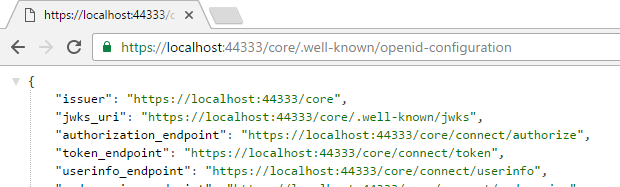
Debug the solution and visit [https://localhost:44333/core/.well-known/openid-configuration](https://localhost:44333/core/.well-known/openid-configuration) to view the configuration.
### MVC Web Application
Create a new ASP.NET Web Application (4.5.x) and select the MVC template; set authentication to **No Authentication**. Add a reference to the **Constants** project. Don't worry about configuring SSL for now.
#### Add the following packages via NuGet:
- Microsoft.Owin.Security.Cookies
- **Microsoft.Owin.Host.SystemWeb**
Create a new class **Startup.cs**. Before the namespace, insert the following attribute
| ``` [assembly: OwinStartup(typeof(MVCResourceOwnerFlow.Startup))] ``` |
| --- |
This attribute instructs the application to execute the `Startup` configuration with each run.
---
If you run into an error when loading the application "`OwinStartup attribute... conflicts with the attribute in assembly... because they have the same FriendlyName`", you will need to provide a unique OWIN startup name according to [Microsoft's documentation](https://www.asp.net/aspnet/overview/owin-and-katana/owin-startup-class-detection). Make sure you include the matching`appSettings` value in your web.config.
---
Create a `Configuration()` method in the `Startup` class. Note the `LoginPath` property; this is the path where users will be redirected when they are not authorized for a specific action.
| ``` public class Startup { public void Configuration(IAppBuilder app) { AntiForgeryConfig.UniqueClaimTypeIdentifier = "http://schemas.xmlsoap.org/ws/2005/05/identity/claims/nameidentifier"; app.UseCookieAuthentication(new CookieAuthenticationOptions { LoginPath = new PathString("/account/login"), AuthenticationType = "Cookies" }); } } ``` |
| --- |
Make copies of `Config\Certificate.cs` and `Config\idsrv3test.pfx` from the **SelfHost** project and change the namespace and the GetManifestResourceStream parameter to match the new locations in the MVC project.
| ``` namespace MVCResourceOwnerFlow { internal static class Certificate { public static X509Certificate2 Get() { var assembly = typeof(Certificate).Assembly; using (var stream = assembly.GetManifestResourceStream("MVCResourceOwnerFlow.idsrv3test.pfx")) { return new X509Certificate2(ReadStream(stream), "idsrv3test"); } } ``` |
| --- |
### Login Page
Create a basic login view model,
| ``` namespace MVCResourceOwnerFlow.Models { public class LoginViewModel { public string Username { get; set; } public string Password { get; set; } } } ``` |
| --- |
and a simple login page.
| ``` @model MVCResourceOwnerFlow.Models.LoginViewModel
``` |
| --- |
### Claims Page
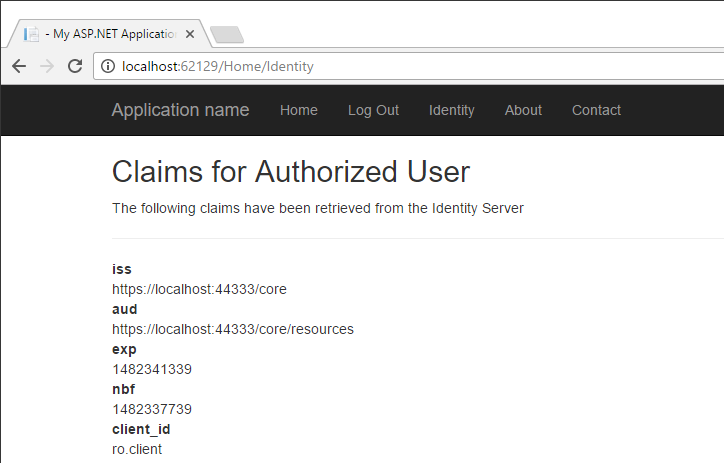
Create a claims view model. This will allow us to view the claims sent with the access token.
| ``` using System.Collections.Generic; namespace MVCResourceOwnerFlow.Models { public class ClaimsViewModel { public string Header { get; set; } public string Message { get; set; } public bool IsAuthenticated { get; set; } public IEnumerable> Claims { get; set; } public ClaimsViewModel() {} public ClaimsViewModel(IEnumerable> claims) { Claims = claims; } } } ``` |
| --- |
Modify the Home controller to include an `Identity` action. The`[Authorize]` attribute secures this action. The user will be redirected to the aforementioned `LoginPath` if not authorized.
| ``` [Authorize] public ActionResult Identity() { return View(GetClaimsViewModel()); } private ClaimsViewModel GetClaimsViewModel() { var identity = (ClaimsIdentity) HttpContext.User.Identity; return new ClaimsViewModel { Header = "Claims for Authorized User", Message = "The following claims have been retrieved from the Identity Server", Claims = identity.Claims.Select(x => new KeyValuePair(x.Type, x.Value)), IsAuthenticated = HttpContext.User.Identity.IsAuthenticated, }; } ``` |
| --- |
Create a simple page to view our claims.
| ``` @model MVCResourceOwnerFlow.Models.ClaimsViewModel
@foreach (var claim in Model.Claims ?? new List>()) {
@claim.Key
@claim.Value
}
}
``` |
| --- |
### Authorization Controller
Now we get to the meat of our solution. Create a new controller.
| ``` using System; using System.Collections.Generic; using System.IdentityModel.Tokens; using System.Linq; using System.Security.Claims; using System.Threading.Tasks; using System.Web; using System.Web.Mvc; using IdentityModel.Client; using Microsoft.Owin.Security.Jwt; using MVCResourceOwnerFlow.Models; using Sample; namespace MVCResourceOwnerFlow.Controllers { public class AccountController : Controller { [HttpGet] [AllowAnonymous] public ActionResult Login() { var model = new LoginViewModel(); return View(model); } [HttpPost] [AllowAnonymous] [ValidateAntiForgeryToken] public async Task Login(LoginViewModel model, string returnUrl) { TokenResponse token = await GetToken(model.Username, model.Password); await SignInAsync(token); return RedirectToAction("Index", "Home"); } private async Task GetToken(string user, string password) { var client = new TokenClient( Constants.TokenEndpoint, "ro.client", "secret"); var result = await client.RequestResourceOwnerPasswordAsync(user, password, "read write"); return result; } public async Task SignInAsync(TokenResponse token) { var claims = await ValidateIdentityTokenAsync(token); var id = new ClaimsIdentity(claims, "Cookies"); id.AddClaim(new Claim("access_token", token.AccessToken)); id.AddClaim(new Claim("expires", DateTime.Now.AddSeconds(token.ExpiresIn).ToLocalTime().ToString())); Request.GetOwinContext().Authentication.SignIn(id); } private async Task> ValidateIdentityTokenAsync(TokenResponse token) { return await Task.Run>(() => { JwtSecurityTokenHandler tokenHandler = new JwtSecurityTokenHandler(); var cert = Certificate.Get(); TokenValidationParameters validationParameters = new TokenValidationParameters { ValidAudience = Constants.BaseAddress + "/resources", ValidIssuer = Constants.BaseAddress, NameClaimType = "name", IssuerSigningTokens = new X509CertificateSecurityTokenProvider( Constants.BaseAddress, cert).SecurityTokens }; SecurityToken t; ClaimsPrincipal id = tokenHandler.ValidateToken(token.AccessToken, validationParameters, out t); var claimList = id.Claims.ToList(); return claimList.AsEnumerable(); }); } [HttpGet] public ActionResult LogOff() { Request.GetOwinContext() .Authentication .SignOut("Cookies"); return RedirectToAction("Index", "Home"); } } } ``` |
| --- |
Note that `GetToken()` uses the sample resource owner client ("ro.client"). Compared to the [sample console client](https://github.com/IdentityServer/IdentityServer3.Samples/tree/master/source/Clients/ConsoleResourceOwnerClient), we perform certificate validation; `ValidateIdentityTokenAsync()` validates the token and returns a set of Claims that can be consumed by the `Request.GetOwinContext().Authentication` object.
Finally, modify the layout view to include links for our new actions.
| ```
@Html.ActionLink("Home", "Index", "Home")
@if (Request.IsAuthenticated) {
@Html.ActionLink("Log Out", "Logoff", "Account")
} else {
@Html.ActionLink("Log In", "Login", "Account")
}
@Html.ActionLink("Identity", "Identity", "Home")
@Html.ActionLink("About", "About", "Home")
@Html.ActionLink("Contact", "Contact", "Home")
``` |
| --- |
### Run the Application
Walk through the login, identity and logout actions. Note when not logged in, if the user visits the claims (Identity) page, they are redirected to login.
### What's Next?
Now that the MVC application has a valid access token, we can make calls to a secured API resource. A good one to start with would be the [IdentityServer3 sample API](https://github.com/IdentityServer/IdentityServer3.Samples/tree/master/source/Clients/SampleAspNetWebApi).
Did you find this post useful? Workstate can help with [modernizing identity](https://resources.workstate.com/blog/how-to-pass-client-data-to-identityserver3-views) and authorization for your application. [Reach out to our team today](http://workstate.com/iam).
### Subscribe to Email Updates
### Recent Posts
### Posts by Topic
- [Cloud Shift (17)](https://resources.workstate.com/blog/topic/cloud-shift)
- [IAM (16)](https://resources.workstate.com/blog/topic/iam)
- [Cloud Computing Best Practices (11)](https://resources.workstate.com/blog/topic/cloud-computing-best-practices)
- [Enterprise Identity (10)](https://resources.workstate.com/blog/topic/enterprise-identity)
- [Identity and Access Management (10)](https://resources.workstate.com/blog/topic/identity-and-access-management)
- [Cloud Migration (8)](https://resources.workstate.com/blog/topic/cloud-migration)
- [Technology Team Rental (8)](https://resources.workstate.com/blog/topic/technology-team-rental)
- [Cloud Shift Best Practices (6)](https://resources.workstate.com/blog/topic/cloud-shift-best-practices)
- [Identity (5)](https://resources.workstate.com/blog/topic/identity)
- [Workstate Codes (5)](https://resources.workstate.com/blog/topic/workstate-codes)
- [AWS (4)](https://resources.workstate.com/blog/topic/aws)
- [Application cloud migration (4)](https://resources.workstate.com/blog/topic/application-cloud-migration)
- [Big Data (4)](https://resources.workstate.com/blog/topic/big-data)
- [For Developers (4)](https://resources.workstate.com/blog/topic/for-developers)
- [Indentity and Access Management Best Practices (4)](https://resources.workstate.com/blog/topic/indentity-and-access-management-best-practices)
- [Lift and Shift (4)](https://resources.workstate.com/blog/topic/lift-and-shift)
- [Workstate (4)](https://resources.workstate.com/blog/topic/workstate)
- [Best practices (3)](https://resources.workstate.com/blog/topic/best-practices)
- [Cloud Innovation (3)](https://resources.workstate.com/blog/topic/cloud-innovation)
- [big data insights (3)](https://resources.workstate.com/blog/topic/big-data-insights)
- [Application Security (2)](https://resources.workstate.com/blog/topic/application-security)
- [Google Cloud (2)](https://resources.workstate.com/blog/topic/google-cloud)
- [IdentityServer3 (2)](https://resources.workstate.com/blog/topic/identityserver3)
- [Insider (2)](https://resources.workstate.com/blog/topic/insider)
- [Microsoft Azure (2)](https://resources.workstate.com/blog/topic/microsoft-azure)
- [data intelligence (2)](https://resources.workstate.com/blog/topic/data-intelligence)
- [hadoop (2)](https://resources.workstate.com/blog/topic/hadoop)
- [Azure Active Directory Best Practices (1)](https://resources.workstate.com/blog/topic/azure-active-directory-best-practices)
- [Design Patterns (1)](https://resources.workstate.com/blog/topic/design-patterns)
- [Development teams (1)](https://resources.workstate.com/blog/topic/development-teams)
- [IdentityModel (1)](https://resources.workstate.com/blog/topic/identitymodel)
- [Programmer Productivity (1)](https://resources.workstate.com/blog/topic/programmer-productivity)
- [QA & Testing (1)](https://resources.workstate.com/blog/topic/qa-testing)
- [Technology mentorship (1)](https://resources.workstate.com/blog/topic/technology-mentorship)
- [identity and access management best practices (1)](https://resources.workstate.com/blog/topic/identity-and-access-management-best-practices)
see all

Columbus
Los Angeles
Pittsburgh
San Francisco
Seattle
**OUR PRACTICES**
[Technology Team Rental](http://workstate.com/teamrental)
[Big Data](http://workstate.com/bigdata)
[Cloud Shift](http://workstate.com/cloud-shift)
[Identity and Access Management](http://workstate.com/iam)
[QA and Testing](http://workstate.com/qa)
[Application Security](http://workstate.com/appsecurity)
**CONTACT**
(614) 559-3904
[hello@workstate.com](mailto:hello@workstate.com)
30 Spruce St. Suite 300
Columbus, OH 43215